
If you work in a browser — and most of us do — you already know the pain of tab overload. You open 40 tabs for a research project, close the window by accident, and spend the next 30 minutes trying to remember what you were looking at. A great Chrome session manager solves this problem permanently. But with so many options on the Chrome Web Store in 2026, which one is actually worth installing?
This guide ranks the best session manager extensions for Chrome right now, evaluates their features side-by-side, and explains exactly which type of user each one suits best. Whether you're a developer, researcher, student, or just someone who keeps too many tabs open, you'll find your answer here.
The top-rated session manager for Chrome is free to try
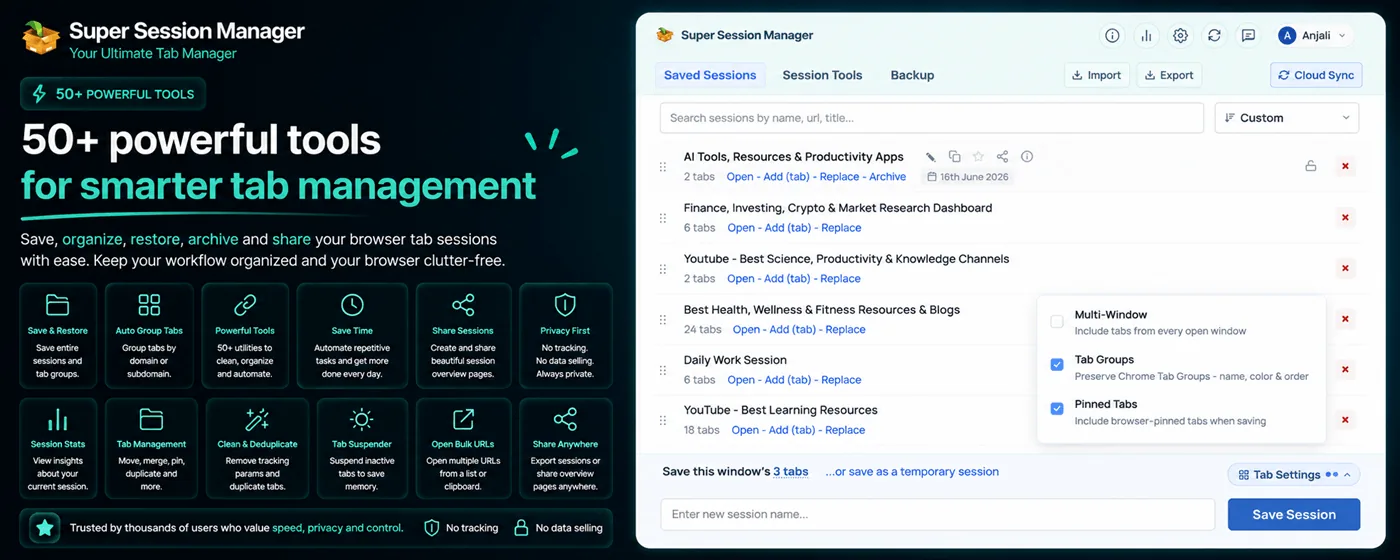
Save entire browser windows in one click. Restore them instantly. Local-first with optional cloud sync.
What Is a Session Manager Extension?
A session manager is a Chrome extension that lets you save a snapshot of your open browser tabs — the entire window, or a selection — give it a name, and restore it later with a single click. Think of it as a "save point" for your browser.
Unlike bookmarks, which save individual URLs, a session manager captures your entire working context: which tabs are open, their order, pinned status, and sometimes even scroll position. When you restore a session, your browser goes back to exactly how it was.
Why You Need One in 2026
- Tab counts are rising. The average knowledge worker has 25+ tabs open at any given time.
- Browser crashes still happen. Despite Chrome's resilience, unexpected shutdowns lose your context.
- Context-switching is expensive. Recreating a research workspace from memory wastes 10–20 minutes per session.
- RAM is still a concern. Saving a session and closing inactive tabs can free gigabytes of memory.
The Best Chrome Session Managers in 2026: Ranked
1. Super Session Manager — Best Overall
Super Session Manager is a session manager built for 2026's web workflows. It offers one-click window saving, named sessions, optional cloud sync across devices, rolling auto-snapshots, tab search, and session statistics — all in a clean, fast UI that doesn't slow down your browser.
What sets it apart is the local-first philosophy: your sessions are saved to chrome.storage.local by default. Cloud sync is opt-in and can be turned off at any time. This is increasingly important as users grow more privacy-conscious.
2. Session Buddy — Veteran Pick
Session Buddy has been around for years and has a loyal user base. It handles large numbers of tabs reliably and offers basic session management. However, its UI hasn't received a major refresh, it lacks cloud sync, and the extension hasn't been updated as frequently as competitors. Read our full Session Buddy comparison.
3. OneTab — RAM Saver
OneTab converts all open tabs into a single list page, freeing up memory. It's excellent for quick RAM relief but doesn't preserve window structure, doesn't have cloud sync, and the saved tab list can become unwieldy quickly. See our OneTab feature comparison.
4. Toby — Team Collaboration
Toby is geared toward teams and offers a visual "collections" interface. It's great for collaboration but heavier than solo-user tools and requires an account from day one.
5. Tab Wrangler — Auto-Close Specialist
Tab Wrangler automatically closes tabs you haven't visited in a while and saves them for later. It's more of a tab lifecycle manager than a full session saver.
Feature Comparison Table
| Feature | Super Session Manager | Session Buddy | OneTab | Toby |
|---|---|---|---|---|
| Named sessions | ✅ | ✅ | ❌ | ✅ |
| One-click window save | ✅ | ✅ | ✅ | ✅ |
| Cloud sync | ✅ (opt-in) | ❌ | ❌ | ✅ (required) |
| Auto-snapshots | ✅ | ❌ | ❌ | ❌ |
| Tab search | ✅ | ✅ | ❌ | ✅ |
| Preserves window structure | ✅ | ✅ | ❌ | ⚠️ partial |
| Local-first / privacy | ✅ | ✅ | ✅ | ❌ |
| Free tier available | ✅ | ✅ | ✅ | ⚠️ limited |
| Manifest V3 ready | ✅ | ⚠️ | ⚠️ | ✅ |
| Active development | ✅ | ⚠️ | ❌ | ✅ |
How to Choose the Right Session Manager
Choose Super Session Manager if…
- You want a modern, actively developed extension
- Privacy matters to you — you want local-first storage
- You occasionally want cross-device access via optional cloud sync
- You want auto-snapshots for crash recovery
- You want statistics and search across sessions
Choose Session Buddy if…
- You already use it and it works fine for your needs
- You only need basic save/restore with no cloud features
Choose OneTab if…
- RAM saving is your primary goal
- You don't need named or structured sessions
What to Look for in a Chrome Session Manager in 2026
- Manifest V3 compatibility — Google is deprecating MV2 extensions. Make sure your extension is MV3-ready.
- Privacy controls — Does it upload your browsing data to a server by default? Look for opt-in sync.
- Active maintenance — Extensions that aren't updated break silently when Chrome updates.
- Restore reliability — Test that it correctly restores pinned tabs, tab order, and window count.
- Performance impact — A session manager should not slow down your browser or use excessive background CPU.
Our Verdict: Super Session Manager Wins in 2026
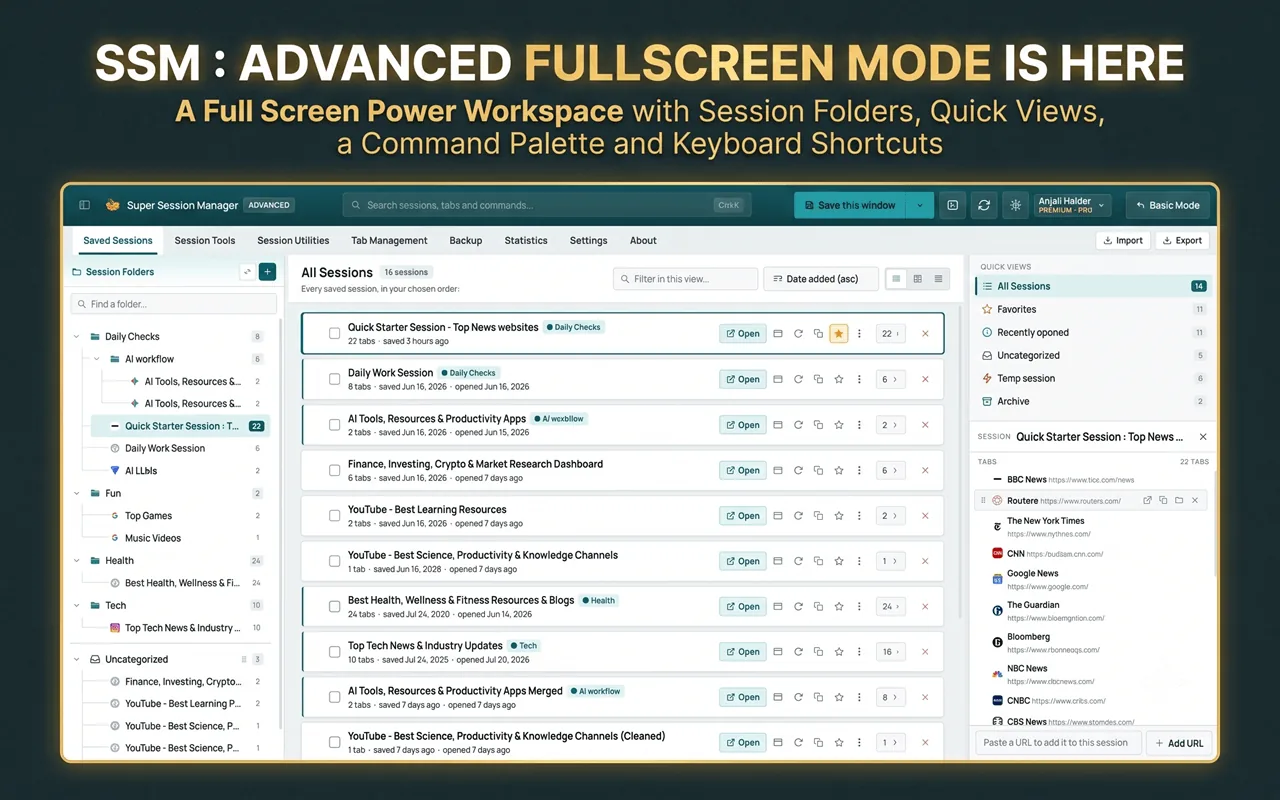
After evaluating all major extensions, Super Session Manager is the best Chrome session manager in 2026 for the vast majority of users. It nails the fundamentals — fast save, reliable restore, named sessions — and layers on advanced features like cloud sync, auto-snapshots, and statistics without adding bloat or compromising privacy.
The free tier is genuinely useful (unlimited local sessions, 3 rolling snapshots, 5 cloud sessions), and the Pro upgrade is priced fairly for users who need unlimited sync and deeper recovery features.
Real-World Workflows: Who Benefits Most?
Session managers are not one-size-fits-all. The best Chrome session manager for you depends on how you actually use the browser day to day. Here is how different user types get the most value from Super Session Manager versus alternatives.
Researchers and Academics
Literature reviews generate 50–200 tabs per project. Researchers need named sessions per research question, auto-snapshots during long reading sessions, and search across saved sessions by domain or keyword. Super Session Manager's cross-session search is essential at this scale — Session Buddy and OneTab cannot match it.
Software Developers
Developers context-switch between tickets, branches, and environments constantly. A session per feature branch ("[DEV] OAuth refactor") lets you pause work without losing localhost tabs, docs, and GitHub issues. Keyboard shortcuts for save make this frictionless.
Remote and Hybrid Workers
If you use a desktop at the office and a laptop at home, local-only session managers create silos. Super Session Manager's opt-in cloud sync bridges devices without forcing you to trust Google with extension data. See our backup and sync guide for setup.
Common Mistakes When Choosing a Session Manager
- Choosing by install count alone. OneTab has millions of installs but lacks named sessions and search. Popularity does not equal fitness for knowledge work.
- Ignoring Manifest V3 readiness. Extensions still on MV2 may stop working as Chrome tightens enforcement. Verify MV3 compatibility before committing.
- Assuming Chrome Sync covers sessions. Chrome Sync handles bookmarks and open tabs, not third-party extension session data. You need a dedicated sync solution.
- Not testing restore reliability. Save a session with pinned tabs and multiple windows, then restore it. Some extensions lose window structure or tab order.
- Installing multiple tab extensions. Running Session Buddy, OneTab, and a session manager simultaneously creates conflicts. Pick one primary tool.
How to Evaluate Any Chrome Session Manager
Use this checklist when trying any session manager extension — including Super Session Manager during your free trial:
- Save a window with 20+ tabs including 2 pinned tabs. Restore it. Verify order and pins.
- Save two separate windows as different named sessions. Restore one without affecting the other.
- Search for a tab by URL fragment across all saved sessions.
- Force-quit Chrome. Reopen and check whether auto-snapshots or crash recovery worked.
- Check extension memory usage in Chrome Task Manager (Shift+Esc). It should be under 50 MB idle.
- Read the privacy policy. Confirm whether data uploads by default or only on opt-in.
Super Session Manager passes every item on this checklist, which is why it ranks first in our 2026 evaluation. For extreme tab counts, also read our ultimate guide to managing thousands of browser tabs.
Chrome Built-in Features vs. Dedicated Session Managers
Google has steadily improved Chrome's native tab tools. Tab Groups, tab search, Reading List, and Memory Saver are genuinely useful. But they solve different problems than a session manager:
- Tab Groups organize tabs within a single running window — they do not survive crashes reliably. See our comparison of tab groups, bookmarks, and sessions for the full picture.
- Tab search finds currently open tabs — not tabs you closed yesterday.
- Reading List saves individual pages — not multi-tab workspaces with order and pinned state.
- Memory Saver suspends inactive tabs — it does not let you name, search, or sync workspaces. Read what tab suspension actually does for how that differs from saving a session.
The gap is named, restorable workspace snapshots. That is what session managers fill. Chrome's built-ins are complements, not replacements. The best setup in 2026 uses Tab Groups for in-window organization and Super Session Manager for save/restore/sync.
Installation and First Steps
Ready to try the top-rated option? Here is a five-minute onboarding:
- Install Super Session Manager from the Chrome Web Store (free, no account required).
- Pin the extension icon to your toolbar.
- Save your current window as "[TEST] My First Session".
- Close all tabs. Open the extension and restore the session.
- Go to
chrome://extensions/shortcutsand assign a save hotkey. - Enable auto-snapshots in extension settings.
If restore works and the tabs come back in order, you have confirmed the most important feature. Everything else — sync, search, statistics — builds on that foundation.
2026 Market Landscape
The Chrome extension ecosystem contracted slightly as Manifest V3 displaced older extensions. Several tab managers from the 2010s no longer receive updates. The survivors — Session Buddy, OneTab, Toby, Workona — each serve a niche. Super Session Manager entered this market with a modern architecture and has become the default recommendation for users who outgrow simpler tools.
Google's own tab features continue improving, but the company has shown no interest in full session management with naming, search, and independent sync. That gap keeps third-party session managers essential for power users in 2026 and beyond.
Whether you are evaluating your first session manager or replacing a tool that no longer meets your needs, start with Super Session Manager's free tier. Compare it against whatever you use today using the evaluation checklist above. Most users know within a week whether they have found their long-term solution.
The investment is minimal: five minutes to install, one week to build the save habit, and a lifetime of crash-safe, searchable, named browser workspaces. Session Buddy and OneTab served the community well in their era. Super Session Manager represents what the category looks like when built for how people actually work in 2026 — across devices, under memory pressure, with privacy expectations that local-first and opt-in sync address directly.
Open the Chrome Web Store and install Super Session Manager, and save your first session before you close this article's tab. That single action is the beginning of a browser workflow that scales from ten tabs to ten thousand without chaos.