
OneTab is one of the most-installed Chrome extensions of all time. Its core promise is simple and compelling: click one button, and all your open tabs collapse into a single list, freeing up memory instantly. For millions of users, it's been the go-to solution for tab overload.
But in 2026, more users are asking whether OneTab is still the best choice — or whether a more fully-featured OneTab alternative like Super Session Manager — a full browser session manager — better serves their workflows. This guide compares both tools across every meaningful dimension so you can decide for yourself.
Get more from your tabs — try Super Session Manager free
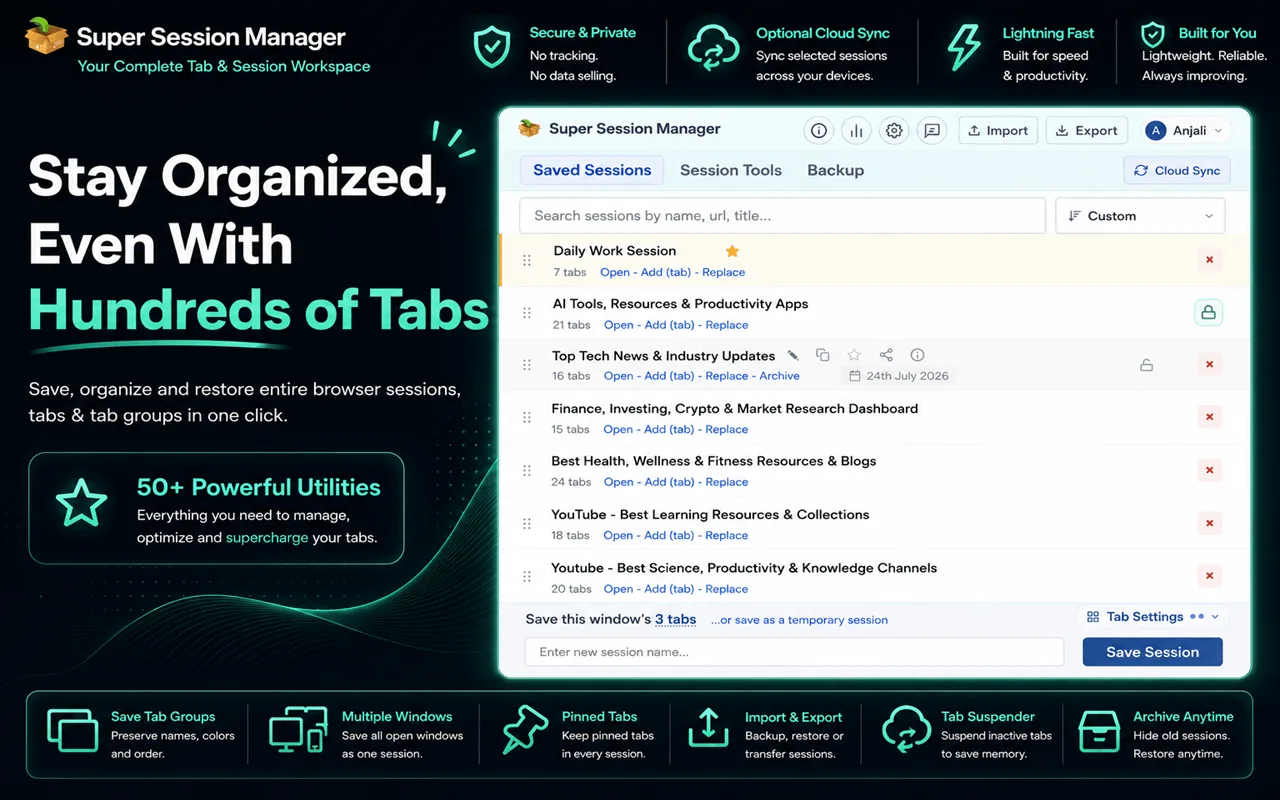
Save entire browser windows in one click. Restore them instantly. Local-first with optional cloud sync.
What OneTab Does Well
OneTab has earned its popularity for good reasons:
- Immediate RAM relief — Clicking the OneTab icon suspends all open tabs and frees significant memory.
- Zero configuration — No setup. Install and start collapsing tabs immediately.
- Shareable lists — You can publish a tab list as a URL to share with others.
- Free — No paid tier, no account required.
But simplicity has a ceiling. As your tab lists grow, OneTab's limitations become increasingly painful.
Where OneTab Falls Short
- No named sessions — Every collection looks the same. You can't label groups by project, context, or workflow.
- No window structure preservation — Tabs from multiple windows are merged into one flat list, losing your organizational context.
- No cloud sync — Tab lists are stuck on one machine. Working across devices means manually exporting HTML.
- No search — With hundreds of saved tabs, there's no way to search by URL or title.
- No auto-snapshots — No background backup means crashes lose context you hadn't manually saved.
- Flat list becomes chaotic — Without structure, your OneTab list turns into a graveyard of forgotten URLs.
- Slow development — OneTab updates have been infrequent; Manifest V3 compatibility has been a concern.
Super Session Manager vs. OneTab: Feature Comparison
| Feature | OneTab | Super Session Manager |
|---|---|---|
| Instant tab collapse / save | ✅ | ✅ |
| Named sessions / groups | ❌ | ✅ |
| Preserves window structure | ❌ | ✅ |
| Restore specific sessions | ⚠️ all at once | ✅ per session |
| Cloud sync (cross-device) | ❌ | ✅ (opt-in) |
| Auto-snapshots | ❌ | ✅ |
| Search by tab/URL | ❌ | ✅ |
| Session statistics | ❌ | ✅ |
| Pinned tab support | ⚠️ | ✅ |
| Keyboard shortcut | ⚠️ partial | ✅ |
| Import / Export | ⚠️ HTML only | ✅ JSON |
| Local-first privacy | ✅ | ✅ |
| Manifest V3 | ⚠️ uncertain | ✅ |
| Free | ✅ | ✅ |
The Key Conceptual Difference
OneTab thinks in lists of URLs. Super Session Manager thinks in named workspace snapshots. This is a fundamental architectural difference that shapes how you interact with your saved tabs every day.
With OneTab, you collapse tabs to save RAM and hope you'll remember to look at the list later. With Super Session Manager, you save a named session ("Research: AI Tools", "Client Project — Beta", "Holiday Reading") and restore it with full context intact.
RAM Performance: Is OneTab Really That Much Better?
OneTab's primary advantage is memory savings. When tabs are "sendt" to OneTab, they are unloaded from memory. Super Session Manager saves sessions but by default keeps your tabs open. However, the workflow difference is what matters:
- If your goal is to suspend all tabs for RAM relief, OneTab remains the faster one-click solution.
- If your goal is to save your workspace and close the window, Super Session Manager is faster because you get a named, searchable session — not just a URL dump.
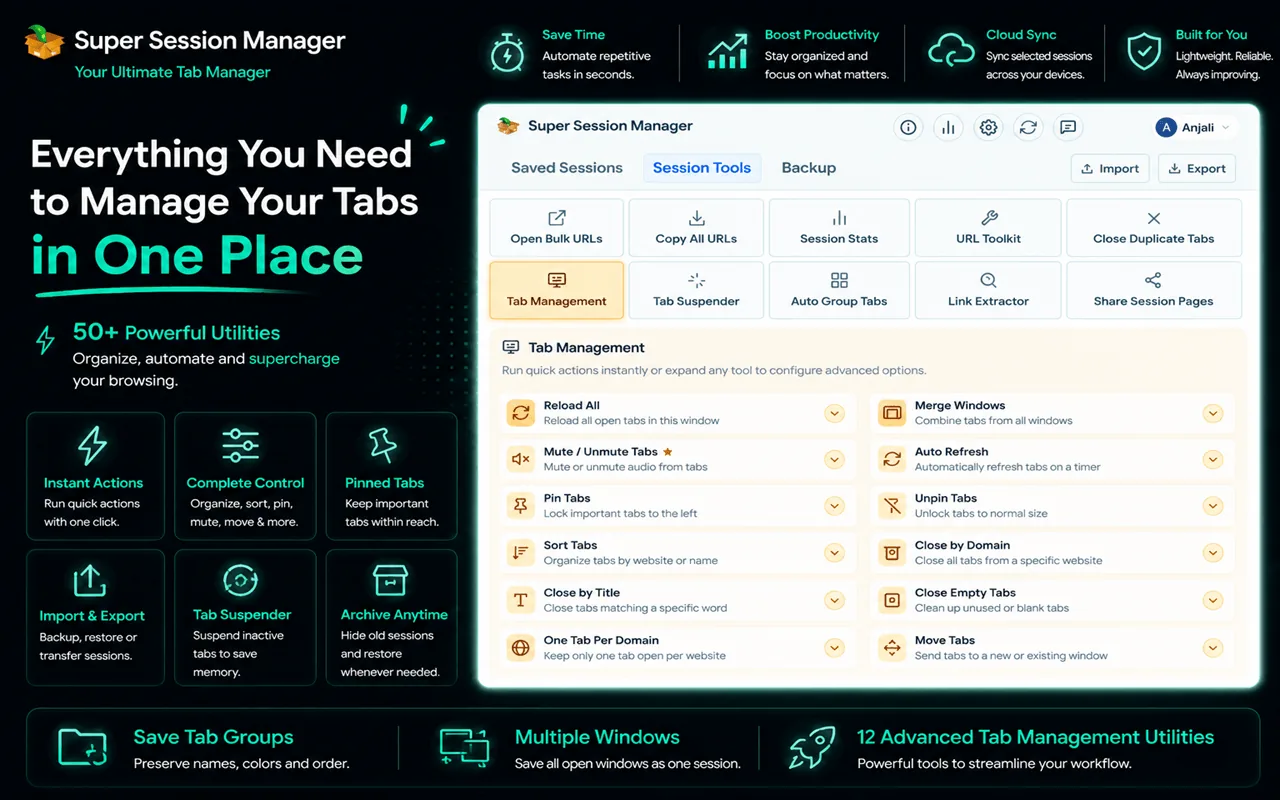
Many power users run both: OneTab for quick RAM relief on individual pages, Super Session Manager for meaningful workspace saves. But if you have to choose one, Super Session Manager's richer feature set wins for anyone doing actual knowledge work. Super Session Manager also has its own built-in Tab Suspender for RAM relief without leaving tabs behind as a flat list — see how browser tab suspension works and our broader guide to freeing up Chrome RAM when you have too many tabs open.
Privacy and Data Handling
Both tools store data locally by default. Super Session Manager's opt-in cloud sync sends session data to its servers only when you sign in and enable sync. OneTab's "share" feature publishes your tab list to a public URL — which means OneTab can upload your browsing data to its servers, something worth being aware of.
Who Should Use Which Tool
Stay with OneTab if…
- You primarily need RAM relief from a large number of casual tabs
- You don't work across multiple devices
- You don't need to revisit saved tabs with any frequency
- You want the absolute simplest possible tool
Switch to Super Session Manager if…
- You do knowledge work with structured research sessions
- You work on multiple projects simultaneously
- You use Chrome on more than one device
- You've ever lost context after a crash
- You want to search across your saved tabs
Also see our guide on how to organize hundreds of browser tabs for more strategies.
Real-World Scenarios: OneTab vs. Super Session Manager
Scenario 1: End-of-day shutdown
You have 45 tabs across two windows from today's work. With OneTab, you click the icon and get one undifferentiated list. Tomorrow, you restore all 45 at once — including the shopping tabs mixed with client research. With Super Session Manager, you save "[CLIENT] Acme Proposal" and "[PERSONAL] Shopping" as separate named sessions, close everything, and restore only what you need tomorrow.
Scenario 2: Browser crash mid-research
OneTab only saves what you manually collapsed. If Chrome crashes before you clicked OneTab, unsaved tabs are gone unless Chrome's built-in recovery works. Super Session Manager's rolling auto-snapshots capture open windows automatically — crash recovery does not depend on you remembering to save.
Scenario 3: Switching from laptop to desktop
OneTab has no sync. You export HTML, email it to yourself, and manually reopen URLs on the other machine — losing window structure. Super Session Manager syncs named sessions to the cloud. Sign in on the desktop, restore the session, done.
Building a Hybrid Workflow
Some users keep OneTab for emergency RAM relief on casual browsing while using Super Session Manager for meaningful workspace saves. This works if you are disciplined about which tool handles which tabs. The risk is confusion — two systems means twice the cognitive overhead.
Our recommendation for knowledge workers: commit to Super Session Manager as your primary tool. Save named sessions and close windows for RAM relief. You get the memory benefit without the flat-list chaos OneTab creates.
Migration Path from OneTab
OneTab exports to HTML, not JSON. There is no direct import into Super Session Manager. Practical migration steps:
- Review your OneTab list. Most URLs are stale — delete anything you do not recognize.
- Group remaining URLs by project mentally.
- Open each group in a Chrome window, save as a named session in Super Session Manager.
- Disable OneTab once your sessions are migrated.
The migration takes 15–30 minutes depending on list size. Most users report deleting 60–80% of their OneTab list during migration — it was clutter they were afraid to close, not valuable references.
Total Cost of Ownership
OneTab is free. Super Session Manager is also free for core functionality. The difference is time cost: OneTab's flat lists become harder to navigate as they grow, costing 5–10 minutes every time you need to find something. Super Session Manager's search and named sessions reduce retrieval to seconds.
For professionals billing $50+/hour, one recovered hour per month from faster tab retrieval or crash recovery justifies any tool investment. Super Session Manager's Pro tier at ~$3/month is optional — the free tier covers most individual users.
OneTab's Share Feature: Privacy Warning
OneTab can publish your tab list as a shareable URL. This uploads your browsing data to OneTab's servers and creates a potentially public link. If your tabs include internal dashboards, client documents, or authenticated admin pages, sharing is risky.
Super Session Manager does not offer public URL sharing of sessions. Cloud sync is private to your account and opt-in. For teams needing shared link collections, dedicated tools like Toby or a team bookmark manager are more appropriate than OneTab's share feature.
Looking Ahead: Tab Management in 2026 and Beyond
Browser vendors will keep adding native tab features, but the fundamental need for named workspace snapshots is not going away. AI-assisted browsing may change how we discover pages, but it will not change the need to preserve a curated set of open tabs across sessions, devices, and crashes.
Super Session Manager is positioned for this future: local-first privacy for users who want it, cloud sync for users who need it, search across growing session libraries, and active development that tracks Chrome's platform changes. OneTab's model of collapsing tabs into undifferentiated lists feels increasingly dated as workflows become more complex.
If you are still on OneTab because it was the first tab tool you found, give Super Session Manager a week. Save named sessions. Close tabs without anxiety. Search for that article you saved last Tuesday. The difference is immediate and permanent.
The Chrome Web Store offers both extensions for free. Install Super Session Manageralongside OneTab for a week. Save named sessions for your real work. Use OneTab only if you still want quick RAM collapse for casual browsing. Most users stop opening OneTab by day five because named sessions solve the underlying problem OneTab only patches.
OneTab solved a real problem in 2011 — tab overload on machines with limited RAM. In 2026, the problem has evolved. Users need named workspaces, crash recovery, cross-device continuity, and search across saved tabs. OneTab addresses none of these. Super Session Manager was built for the current era of browser-based knowledge work. The comparison is not close for anyone doing serious work in Chrome.
Feature comparisons matter, but the real test is daily use. Save a named session today. Close the window. Restore it tomorrow. If that workflow feels better than scrolling through a OneTab list, you have your answer. Super Session Manager is free to try and takes thirty seconds to install. The only cost is not trying it sooner.
Every OneTab user hits the same wall: a growing list they cannot search, cannot name, and cannot sync. Super Session Manager removes that wall entirely. Try it free and compare your own daily experience — that is the only comparison that matters.
Free install. No account. No risk. Try Super Session Manager on the Chrome Web Store alongside OneTab and see which one you reach for on day three. Most users never go back.