
Chrome has over 3 billion users, and a significant portion of them struggle with tab overload. The Chrome Web Store has hundreds of tab management extensions claiming to solve the problem — but most are either underpowered, unmaintained, or invasive. This guide cuts through the noise to give you the definitive ranked list of the best tab manager extensions for Chrome in 2026.
We evaluated each extension on feature breadth, UI quality, privacy practices, Manifest V3 compatibility, update frequency, and value. Here's what we found.
The #1 rated tab manager for Chrome — try it free today
Save entire browser windows in one click. Restore them instantly. Local-first with optional cloud sync.
1. Super Session Manager — Best Overall Tab Manager
Category: Full session manager | Price: Free (Pro available)
Super Session Manager is the most complete session manager and tab management solution for Chrome in 2026. It's built on Manifest V3, actively maintained, and takes a local-first privacy approach that's increasingly rare in browser extensions.
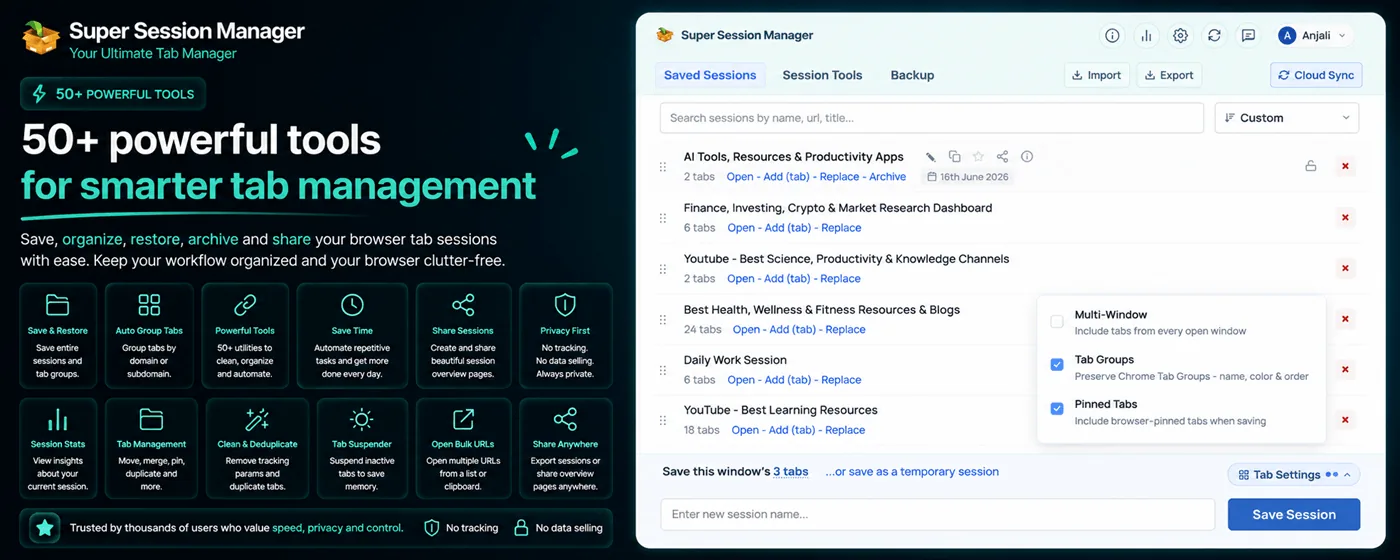
Key Features
- One-click save of entire windows as named sessions
- Rolling auto-snapshots for crash protection
- Optional cloud sync across devices (free: 5 sessions, Pro: unlimited)
- Tab search across all sessions by URL, title, or session name
- Session statistics dashboard
- Drag-to-reorder sessions, pinned favorites
- Import/export JSON for portability
- Keyboard shortcut to save current window
Ideal for: Knowledge workers, researchers, developers, and anyone who juggles multiple projects in Chrome.
2. Session Buddy — The Reliable Veteran
Category: Session manager | Price: Free
Session Buddy has a long track record and a loyal user base. It offers reliable save and restore for sessions and tabs, plus a full-page interface that gives you an overview of all open and saved tabs. However, it lacks cloud sync, auto-snapshots, and modern UI polish. Read our full Session Buddy vs. Super Session Manager comparison.
Ideal for: Users who want a simple, proven tool without cloud sync.
3. OneTab — The RAM Saver
Category: Tab collapse | Price: Free
OneTab converts all open tabs into a single list page, immediately freeing memory. It's perfect for quick RAM relief but falls short as a session management tool — no named sessions, no window structure, no search, no sync. See our detailed OneTab comparison or our broader guide to freeing up Chrome RAM when you have too many tabs open.
Ideal for: Casual users who primarily need RAM relief, not workspace management.
4. Toby — The Team Collaboration Tool
Category: Collection manager | Price: Freemium
Toby is designed for teams that want to share URL collections. It replaces the new tab page with a visual board of "collections" that can be shared with colleagues. The UI is polished and it integrates with some team tools. Requires an account from day one, and the free tier has limited collection capacity.
Ideal for: Small teams sharing research or resource lists.
5. Tab Wrangler — The Auto-Close Specialist
Category: Tab lifecycle manager | Price: Free
Tab Wrangler automatically closes tabs you haven't interacted with in a configurable time period and saves them to a recoverable list. It's less of a session manager and more of a tab janitor — great for preventing accumulation but not for organized saves.
Ideal for: Users who want Chrome to automatically control their tab count.
6. Workona — The Workspace Manager
Category: Workspace manager | Price: Freemium
Workona takes a "workspace" approach, replacing the new tab page with a dashboard of named workspaces. It integrates with Google Drive, Asana, and other tools. However, it's heavier than a typical extension and requires an account with data stored on Workona's servers, raising privacy considerations.
Ideal for: Power users who want deep integration with productivity apps.
7. TabCopy — The URL Exporter
Category: URL exporter | Price: Free
TabCopy quickly copies URLs of open tabs to your clipboard in various formats (plain list, Markdown, JSON). It's a utility tool, not a session manager, but invaluable for developers and writers who need to share sets of URLs.
Ideal for: Developers, writers, and researchers who share tab sets regularly.
Comparison Table: Best Chrome Tab Manager Extensions 2026
| Extension | Named Sessions | Cloud Sync | Auto-Snapshots | Tab Search | MV3 | Free |
|---|---|---|---|---|---|---|
| Super Session Manager | ✅ | ✅ opt-in | ✅ | ✅ | ✅ | ✅ |
| Session Buddy | ✅ | ❌ | ❌ | ✅ | ⚠️ | ✅ |
| OneTab | ❌ | ❌ | ❌ | ❌ | ⚠️ | ✅ |
| Toby | ⚠️ collections | ✅ (required) | ❌ | ✅ | ✅ | ⚠️ limited |
| Tab Wrangler | ❌ | ❌ | ❌ | ❌ | ✅ | ✅ |
| Workona | ✅ workspaces | ✅ (required) | ❌ | ✅ | ✅ | ⚠️ limited |
| TabCopy | ❌ | ❌ | ❌ | ❌ | ✅ | ✅ |
How to Choose the Right Tab Manager for You
For the power user or researcher
Go with Super Session Manager. Named sessions, auto-snapshots, cloud sync, and search cover every workflow you'll encounter.
For teams
Consider Toby or Workona if deep collaboration features outweigh privacy concerns and cost. For privacy-conscious teams, Super Session Manager's opt-in sync keeps data under your control.
For quick RAM relief only
OneTab is the fastest path to freeing memory from casual tab accumulation.
For automatic tab hygiene
Tab Wrangler runs quietly in the background and keeps your tab count in check without manual intervention.
What About Chrome's Built-in Tab Features?
Chrome includes several native tab management features worth knowing:
- Tab Groups — Color-label related tabs within a window.
- Tab Search — The down-arrow button in the top-right of the tab bar searches all open tabs.
- Reading List — Save individual pages for later (accessible in the bookmarks sidebar).
- Memory Saver — Automatically suspends inactive tabs to save RAM (Settings → Performance). See how browser tab suspension actually works for what suspending a tab does under the hood.
These built-ins are useful but not replacements for a dedicated session manager. They can't save named sessions, sync across devices, or restore from crashes.
Extensions We Do Not Recommend in 2026
Not every tab extension on the Chrome Web Store is worth installing. Avoid:
- Abandoned extensions — Check last update date. No update in 12+ months is a red flag during the MV3 transition.
- Extensions requesting excessive permissions — A tab manager should not need access to all browsing data on all sites unless it has a clear reason.
- Duplicate functionality — Installing three tab savers creates confusion about which one actually has your data.
- New tab page replacements you did not ask for — Some managers hijack your new tab. Super Session Manager uses a popup — your new tab stays clean.
Evaluation Criteria We Used
Our 2026 rankings weight these factors:
- Core functionality (30%): Named sessions, restore reliability, multi-window support.
- Advanced features (25%): Auto-snapshots, cloud sync, search, statistics.
- Privacy (20%): Local-first defaults, opt-in sync, transparent policies.
- Maintenance (15%): Update frequency, MV3 readiness, bug response.
- Value (10%): Free tier generosity, fair Pro pricing.
Super Session Manager leads on every weighted category except raw RAM collapse speed, where OneTab still wins for its specific one-click-suspend use case.
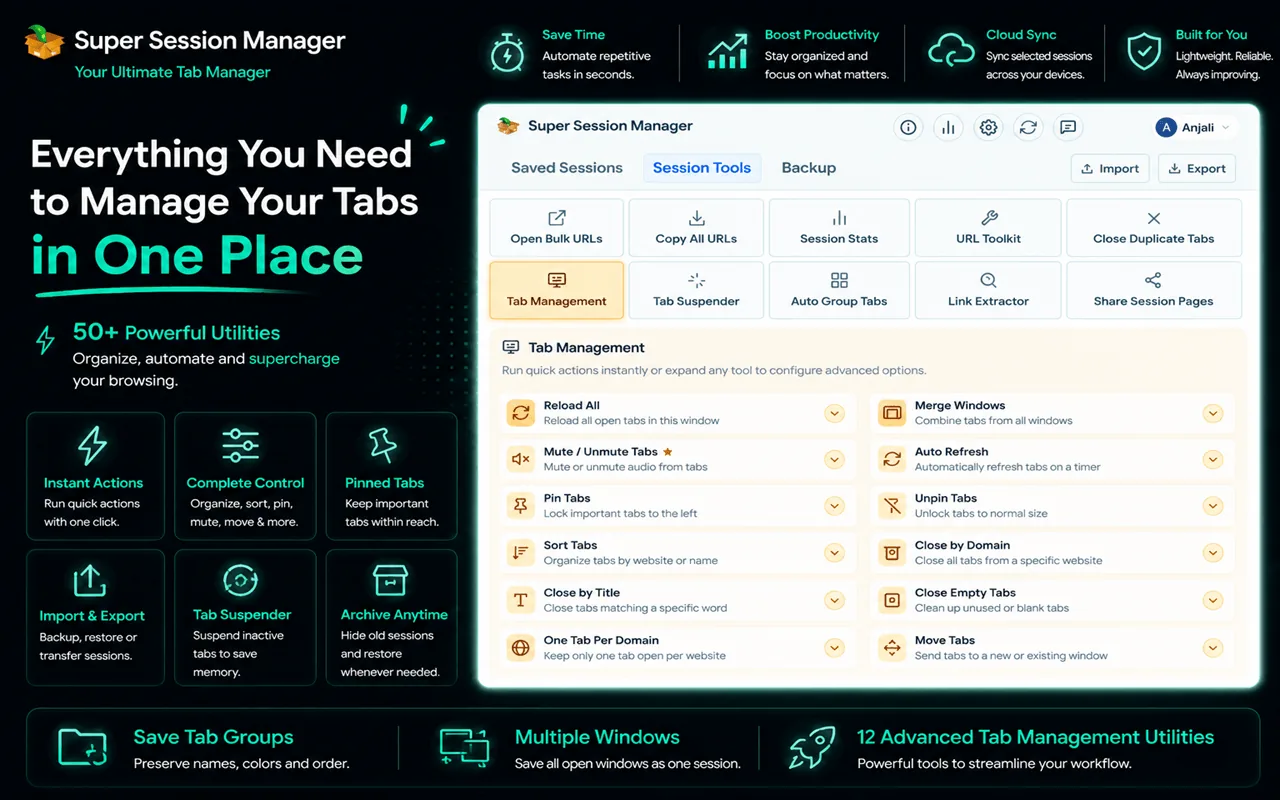
Setting Up Your Tab Manager Stack
The ideal 2026 tab management stack for a power user:
- Super Session Manager — primary session save, restore, sync, and search.
- Chrome Tab Groups — in-window visual organization (built-in, free).
- Chrome Memory Saver — automatic suspension of inactive tabs (built-in).
- TabCopy (optional) — quick URL export when sharing links with teammates.
That is four tools with clear, non-overlapping roles. Compare the top session managers in our best session manager for Chrome 2026 guide, or see our guide on cleaning up duplicate and unwanted browser tabs to keep that stack tidy once it is set up.
Browser-Specific Notes
This guide focuses on Chrome, but tab management pain is universal. Super Session Manager also supports Microsoft Edge (Chromium-based, same extension from the Chrome Web Store) and Firefox (dedicated Firefox extension). The feature set is consistent across browsers.
If your organization standardizes on Edge, the same session workflows apply. Session Buddy and OneTab are Chrome-centric; verify Edge compatibility before deploying team-wide.
When to Upgrade to Pro
Super Session Manager's free tier is generous. Consider Pro when:
- You need more than 5 cloud-synced sessions across devices
- You want 100 rolling auto-snapshots instead of 3
- You work on 10+ concurrent projects and need unlimited cloud backup
- You value supporting active development of the tool you depend on daily
See pricing for current Pro and lifetime options. Most individual users never need to upgrade — the free tier handles hundreds of local sessions.
Making the Decision Today
You do not need to test all seven extensions on this list. If you are a Chrome power user, researcher, or developer who manages multiple projects in the browser, start with Super Session Manager. It is the only tool that combines named sessions, auto-snapshots, search, optional cloud sync, and active MV3 development in one free package.
Add Chrome Tab Groups and Memory Saver as built-in complements. Consider TabCopy if you frequently share URL lists. Skip the rest unless you have a specific niche need — team collections (Toby), automatic tab janitor (Tab Wrangler), or deep app integration (Workona).
The best tab manager is the one you actually use. Super Session Manager's one-click save and keyboard shortcut make it the easiest to build into daily habits — which is the real test of any productivity tool.
The Chrome Web Store has no shortage of tab extensions. But breadth is not depth. For the complete package — save, restore, name, search, sync, snapshot, and statistics — only Super Session Manager delivers all seven in a single free extension. That is why it tops our 2026 rankings and why it should be the first tab manager you install.
Tab management is not glamorous work. Nobody lists "organized browser tabs" on a resume. But the hours lost to crash recovery, link hunting, and RAM-related slowdowns add up to real professional cost. The right extension pays for itself in the first week. Install Super Session Manager from the Chrome Web Store and experience what a purpose-built 2026 tab manager feels like compared to the workarounds you have been using.
We revisit this list annually as the extension landscape shifts. In 2026, Super Session Manager leads because it is the most complete, actively maintained, privacy-respecting option with a genuinely useful free tier. Session Buddy and OneTab remain viable for narrow use cases. Everything else fills a specific niche. Choose based on your actual workflow, not install counts — and when in doubt, start with the tool that does the most.
Your tabs represent your work. The extension managing them should be actively maintained, privacy-respecting, and built for how you actually browse in 2026. Super Session Manager checks every box. Install it from the Chrome Web Store, save your first session, and see why it leads this list.
Free to install. No account required. Works immediately. There is no reason to delay. Thousands of Chrome power users already rely on Super Session Manager daily.