
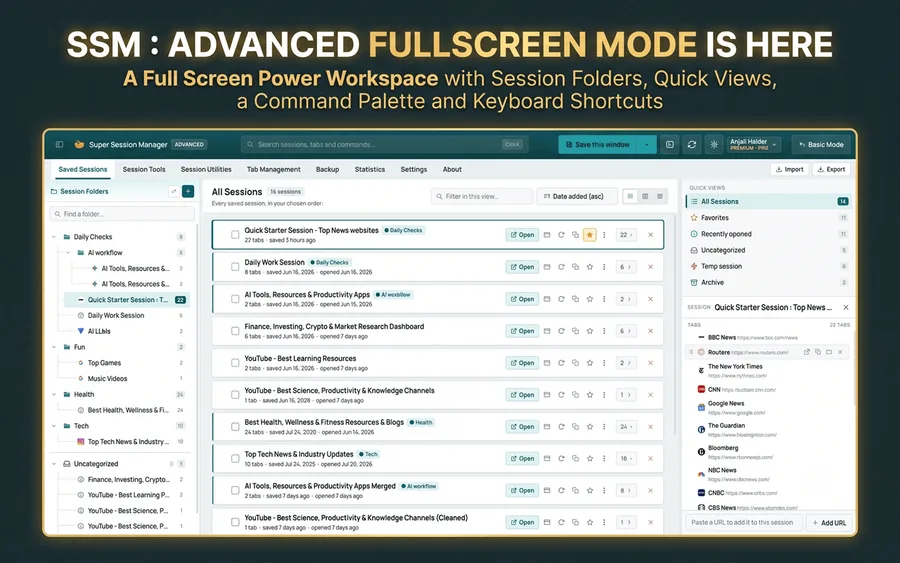
The extension has taken a huge leap forward. What started as a very competent session manager has become a top-tier productivity tool. Advanced Mode is primarily responsible for this change: having a complete workspace where you can visualize all your sessions, with its integrated command palette, makes tab management truly fluid and professional. It's like going from taking notes on a notepad to working with an IDE: the difference in day-to-day use is massive. Once you try Advanced Mode, going back to the traditional method feels like a step backward. I think this extension marks a turning point for anyone juggling multiple projects at once. If you work with multiple contexts, you'll notice the difference from day one. I would recommend it without hesitation to researchers, developers, or simply anyone who wants to get much more out of their browsing sessions and avoid headaches from keeping dozens of tabs open.
The Ultimate
Browser Session Manager
Save, organize and restore browser sessions, tabs and bookmarks with one powerful extension. Manage your browsing workflow with a session manager, tab manager and bookmark manager, plus local-first storage and optional cloud sync.
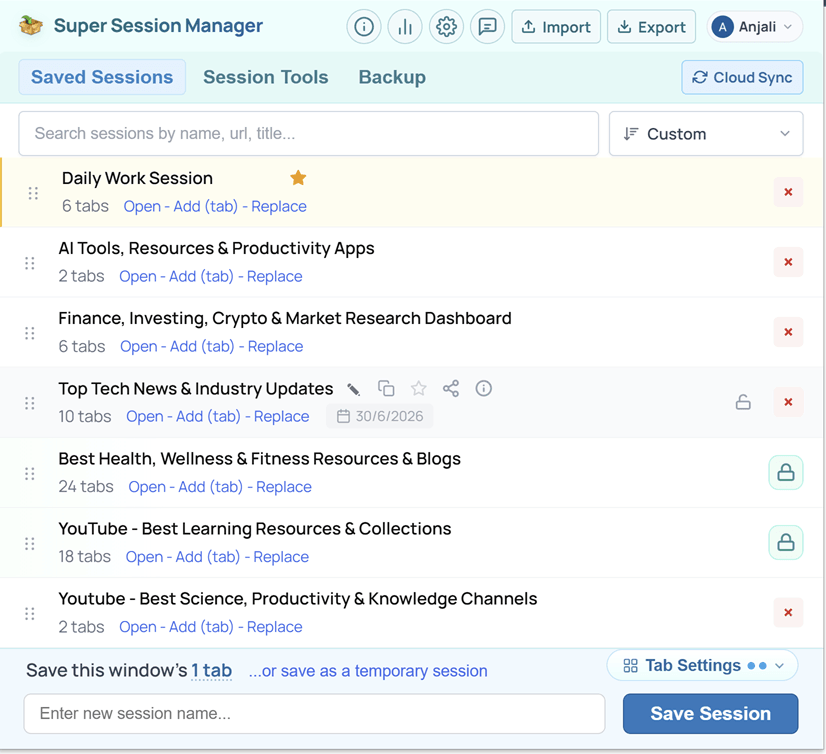
100+ browser productivity tools in one extension
The ultimate browser session toolkit. 100+ built-in utilities that save time, reduce clutter & manage multiple tabs effortlessly.
Open Bulk URLs — Paste mixed text — every link opens in the current or a new window.
Copy All URLs — Export open tabs or saved sessions as plain text, Markdown, TXT, or CSV.
Extract URLs — Pull http(s) links from pasted text — copy, open, or save as a session.
URL Cleaner — Strip utm_*, fbclid, gclid, and other tracking params in one click.
Dedupe URLs — Remove duplicate links while keeping first-occurrence order.
Close Duplicate Tabs — Scan the window and close tabs that share the same URL.
Session Stats — Tab totals, duplicates, inactive tabs, and top domains at a glance.
Extract Domains — Pull unique hostnames from URLs — copy or download the list.
Tab Suspender — Sleep inactive tabs to free memory — click any tab to wake it.
Share Session Pages — Publish tabs to a shareable link at sessionmanager.net/share/session-page-url
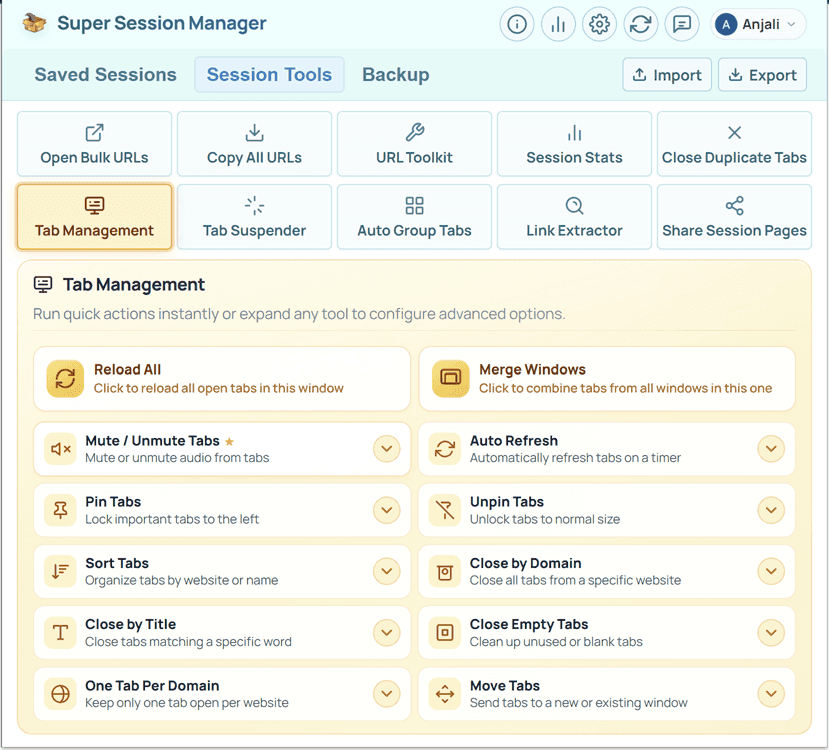
Everything to declutter your browser
Built for power users who juggle research, work, and reading — all at once.
Unlimited local sessions
Save as many named tab groups as you need right on your device.
- Separate work, research etc. sessions
- Fast restore from Chrome storage
One-click restore
Open, Add or Replace tabs from any saved session or temp sessions.
- Restore complete tab sets in one click
- Use keyboard shortcut to save session
Favorite pinning
Keep important sessions at the top to prioritize daily workflows.
- Free includes 1 favorite
- Pro unlocks unlimited pinned sessions
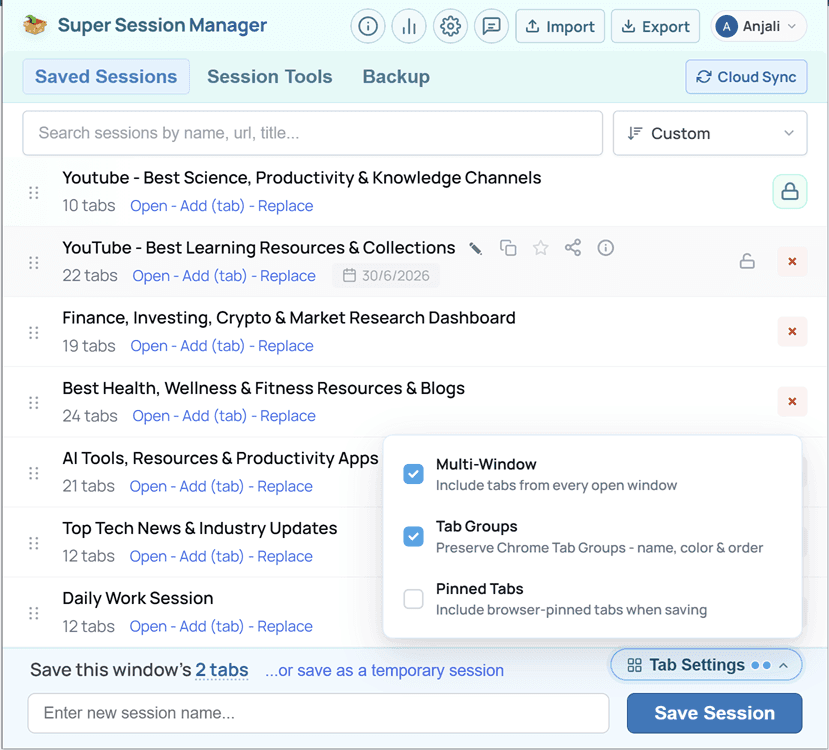
Tab Settings panel
Fine-tune what gets captured when you save with a footer popover.
- Pinned Tabs toggle (free)
- Multi-Window capture across all windows
Rolling auto-snapshots
Automatic backups help you recover recent browser states automatically
- Free keeps 3 rolling snapshots
- Pro expands to 100 snapshots
Optional cloud sync
Sync named sessions to your account for multi-device access.
- Free includes 5 cloud sessions
- Pro unlocks unlimited cloud sync
Auto-sync on change
Pro keeps edits current across machines without manual sync
- Manual sync stays available
- Great for laptop-to-desktop handoffs
Advanced session sorting
Reorder your list by how you actually use sessions (favorites stay on top)
- Free: custom sorting and date added
- Pro: last opened and most used
Search and tab preview
Find sessions by name, URL or title and inspect tabs before restoring
- Clickable tab links in the info tooltip
- Copy all URLs from any session row
Smart session details
See useful session context at a glance to select sessions easily
- Tab counts, dates, and opened X times
- Hover info tooltip with clickable tab links
Session Tools
Ten built-in utilities for URL lists, tab cleanup, and memory management
- Bulk open, copy, dedupe, and clean URLs
- Close duplicate & suspend inactive tabs
Shareable session pages
Publish a saved session to a public link on sessionmanager.net
- Public or unlisted visibility
- Free: 3 pages · Pro: unlimited
Recovery and portability
Built-in backups & exports for recovery, migration & peace of mind.
- Import and Export JSON
- Deleted session recovery (Pro)
Quick temp sessions
Save tabs instantly without naming — perfect for in-progress work.
- Preview all URLs and download as .txt
- Open, Add, or promote to a named session
Chrome Tab Groups
Pro saves your Chrome tab groups — names, colors, order etc.
- Groups recreated when you open a session
- Enable in Tab Settings when saving
Usage stats dashboard
Track sessions, tabs, and storage from the header chart icon easily
- Most used and last used at a glance
- Hover quick-open cards to jump back in
No Ads
No ad networks inside the extension.
No Tracking
No invasive cross-site tracking.
No Data Selling
Your private & session data is never sold.
No Login Required
Works locally without an account.
Local Storage First
Default saves stay on your device.
Export Anytime
Export sessions whenever you want.
User Controlled Sync
Cloud Sync is optional and secure.
Transparent Permissions
Permissions match the features you use.
Built for Privacy, Not Tracking Your Tabs Never Leave Without Permission
Your tabs belong to you. By default, Super Session Manager stores sessions locally in your browser and does not upload them unless you explicitly enable Cloud Sync.
- Saved sessions live in
chrome.storage.localon your device only, unless you choose to sync to securely access your saved sessions across multiple browsers and devices. - We don't sell your information, we don't run ads in the extension, and we don't use invasive cross-site tracking.
- No login required — sign in only for optional Cloud Sync & some extension features.
- Rolling auto-snapshots always stay on-device only — they are never uploaded.
- Listed on Chrome Web Store, Firefox Add-ons, and Edge Add-ons — built on Manifest V3 with transparent permissions.
Designed for Flow State
Spend less time managing tabs and more time doing meaningful work — without breaking focus.
Drag, Drop, Done — Reorder sessions — custom sort keeps your layout intact.
Search Before You Open — Find sessions by name, URL, or tab title instantly.
Preview Before Open — Inspect saved tabs before you restore a session.
Pin Favorites — Daily workflows stay at the top of your list.
Temp Sessions — Capture this window instantly — no naming required.
Keyboard Shortcuts — Save or restore without leaving the keyboard.
One-Click Restore — Open, Add, or Replace — you choose how tabs return.
Rolling Auto-Snapshots — On-device backups recover recent states silently.
Tab Groups Preserved — Pro saves group names, colors, order, and collapsed state.
Stats at a Glance — Sessions, tabs, most used, last used, and storage in one tap.
Sort Your Way — Custom, date, last opened, or most used — favorites lead.
Import & Export — Move sessions between browsers with JSON anytime.
Ready to take control?
Save and restore tab sessions, with optional cloud sync when you sign in.
Trusted & loved by thousands of users
Real reviews from people who manage their browser sessions with Super Session Manager every day.
Session manager FAQ
Common questions about saving, organizing and restoring browser sessions with Super Session Manager.
What is a session manager?
A session manager is a browser extension that saves your open tabs and windows as a named session, so you can close them and restore everything later in one click. Unlike a bookmark, a session captures your whole working context — every tab, its order and its pinned state — and brings it back exactly as you left it.
What is the difference between a session manager and bookmarks?
Bookmarks save individual pages for long-term reference. A browser session manager saves a complete set of tabs as one unit you can reopen together, which suits projects, research and anything you plan to come back to. Super Session Manager can also turn your existing bookmarks into organized sessions. Read the full comparison.
Is Super Session Manager free?
Yes. The extension is free to install and use, with no account required. The free plan includes unlimited local sessions, one-click save and restore, rolling auto-snapshots and JSON import and export. Pro adds unlimited cloud sync, multi-window saving, tab group restore and more.
Which browsers does the session manager support?
Super Session Manager has dedicated versions for Google Chrome, Mozilla Firefox and Microsoft Edge, each installed free from its official store. Move sessions between browsers with JSON export and import, or with optional cloud sync.
Where are my sessions stored? Is my data private?
Sessions are stored locally in your browser by default, and nothing leaves your device unless you sign in and choose to use cloud sync. Cloud sync is optional, and you can turn it off at any time in the extension settings.
Can a session manager restore my tabs after a crash?
Yes. Super Session Manager can take rolling auto-snapshots of your open windows in the background, so if your browser crashes, updates or restarts unexpectedly, you can bring your tabs back from the latest snapshot in one click — even if you never saved a session yourself.
Browser tips & guides
Expert articles on tab management, session saving, and Chrome productivity.